 How to Return
How to Return
 How to Return
- STEP 01STEP 01No need to worry about carefully packing things back up. Just pack your returns, and include any hangers, plastic coverings (we recycle them!), dustbags, or boxes.
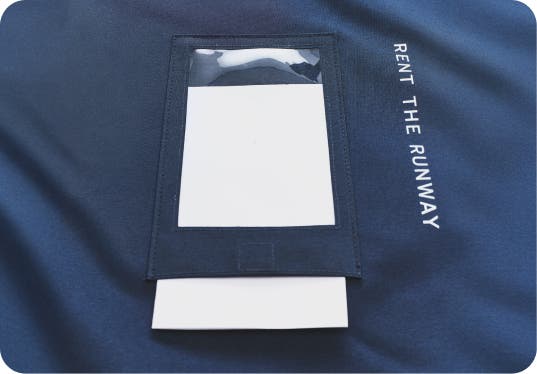
- STEP 02STEP 02Swap the label right in the outside clear pouch and secure the velcro closure—or, with an older bag, paste the prepaid return label on the cardstock from the bag's inside pocket.
- STEP 03STEP 03Drop off at your local UPS (or, if you live in an eligible zip code, schedule an at-home pickup).
Lost your return label?
Lost your return label?
Head to Order History under your account (or My RTR in app) and request a new return label for your latest shipment.
Your top questions, answered
Your top questions, answered
Pack up your rentals in the garment bag they came in. Be sure to return accessories and handbags in their dust bags or boxes. If you choose to send the hangers or plastic dry cleaning bags back with your rentals, we'll recycle them! No need to hang your items back up, we'll take care of that for you.
Remove the prepaid return label from the inside pocket of the garment bag and insert it into the plastic pouch on the outside of the bag. Fold the bag, tuck in the handles, and zip it shut. Then, you're ready to send your garment bag back via UPS.
Please be sure to return on or before your rental end date, or you will be charged late fees in accordance with our policy.
We also offer Home Pickup in select zip codes for membership orders only. If you are eligible for pickup, you will be prompted to schedule a pickup after confirming your membership order.
Remove the prepaid return label from the inside pocket of the garment bag and insert it into the plastic pouch on the outside of the bag. Fold the bag, tuck in the handles, and zip it shut. Then, you're ready to send your garment bag back via UPS.
Please be sure to return on or before your rental end date, or you will be charged late fees in accordance with our policy.
We also offer Home Pickup in select zip codes for membership orders only. If you are eligible for pickup, you will be prompted to schedule a pickup after confirming your membership order.
We have fulfillment centers in both Texas and New Jersey, so your shipments may occasionally arrive in two separate packages.
Whenever you’re done enjoying your items, put them in the garment bag that part of your order arrived in and send it back to us with the return label provided. Your return label will always be found in your garment bag.
Whenever you’re done enjoying your items, put them in the garment bag that part of your order arrived in and send it back to us with the return label provided. Your return label will always be found in your garment bag.
If you do not have a prepaid return label, head to your Order History and tap “Request Replacement Label.” UPS will send a replacement label to the email listed on your account. If you no longer have a garment bag at home, please use your own packaging for your return.
After you tap “Swap” on your old items and place a new order, we assume the next shipping label that is scanned at a drop-off location will include those returns. If you happen to use a shipping label associated with another account, your drop off will not be reflected and you won't receive real-time updates on your returns' journey back to us. Your return will be recognized once it gets back to RTR.
Although most shipping carriers are closed on Sundays and observed holidays, you can still send your items back via UPS drop box on your rental end date. If you are sending your items back at a UPS store which may be closed on Sunday or a holiday, you may drop it off by 12pm on the day following your rental end date and you will not be charged late fees.
Currently, we only offer Home Pickup for membership orders in select zip codes.
If home pickup is available in your market, you’ll be automatically prompted to schedule a pickup right after confirming your next shipment. If you change your mind and want to schedule after confirming your order, head to My RTR > Schedule a Home Pickup. Learn more here.
If home pickup is available in your market, you’ll be automatically prompted to schedule a pickup right after confirming your next shipment. If you change your mind and want to schedule after confirming your order, head to My RTR > Schedule a Home Pickup. Learn more here.